
Kia Soul (SK3): LCD display / Trip information (trip computer)
The trip computer is a microcomputercontrolled driver information system that displays information related to driving.
NOTICE
Some driving information stored in the trip computer resets if the battery is disconnected.
Trip Modes
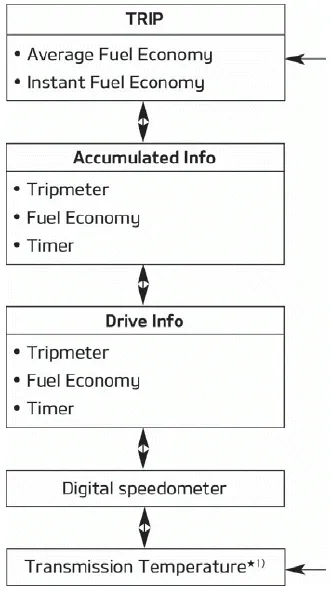
To change the trip mode, scroll the toggle the switch ( )
on the steering wheel.
)
on the steering wheel.
Fuel economy
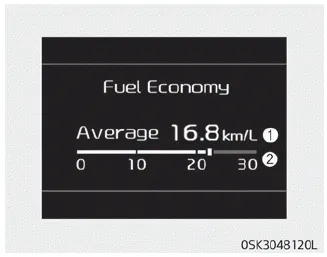
Average Fuel Economy (1)
- The average fuel economy is calculated by the total driving distance and
fuel consumption since the last average fuel economy reset.
- Fuel economy range: 0 ~ 99.9km/L, L/100 km or MPG - The average fuel economy can be reset both manually and automatically.
Manual reset
To clear the average fuel economy manually, press the OK button on the steering wheel for more than 1 second when the average fuel economy is displayed.
Automatic reset
To make the average fuel economy be reset automatically whenever refueling, select the “Fuel economy auto reset” mode in User Setting menu of the LCD Windows (Refer to “LCD Windows” on page 4-51).
- OFF - You may set to default manually by using the trip switch reset button.
- After ignition - The vehicle will automatically set to default once 4 hours pass after the Ignition is in OFF.
- After refueling - After refueling more than 6 liters and driving over 1 km/h, the vehicle will reset to default automatically.
NOTICE
The average fuel economy is not displayed for more accurate calculation if the vehicle does not drive more than 10 seconds or 50 meters (0.03 miles) since the ignition switch or Engine Start/Stop button is turned to ON.
Instant Fuel Economy (2)
• This mode displays the instant fuel economy during the last few seconds when the vehicle speed is more than 10 km/h (6.2 MPH).
- Fuel economy range:
0.0 ~ 30km/L, L/100km or 0.0 ~ 50.0 MPG
Accumulated driving information mode
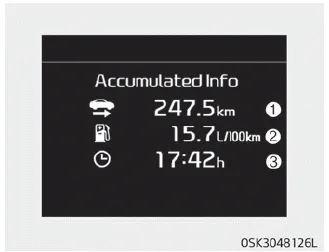
This display shows the accumulated trip distance (1), the average fuel efficiency (2), and the total driving time (3).
- Accumulated information is calculated after the vehicle has run for more than 300 meters.
- If you press "OK" button for more than 1 second after the Cumulative Information is displayed, the information will be reset.
- If the engine is running, even when the vehicle is not in motion, the information will be accumulated.
One time driving information mode

This display shows the trip distance (1), the average fuel efficiency (2), and the total driving time (3) information once per one ignition cycle.
- Fuel efficiency is calculated after the vehicle has run for more than 300 meters.
- The Driving Information will be reset 4 hours after ignition has been turned off.
So, when the vehicle ignition is turned on within 4 hours, the information will
not be reset.
- If you press "OK" button for more than 1 second after the Driving Information
is displayed, the information will be reset.
- If the engine is running, even when the vehicle is not in motion, the information
will be accumulated.
Digital speedometer
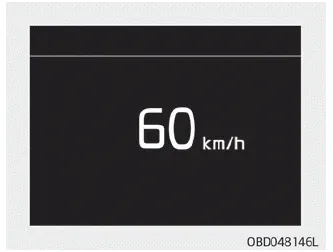
This mode displays the current speed of the vehicle.
Trip computer mode The trip computer mode displays information related to vehicle driving parameters including fuel economy, tripmeter information and vehicle speed.
Service in It calculates and displays when you need a scheduled maintenance service (mileage or days). If the remaining mileage or time reaches 1,500 km (900 mi.
Other information:
Kia Soul (SK3) 2020-2025 Owners Manual: If you have a flat tire (with Tire Mobility Kit)
Please read the instructions before using the Tire Mobility Kit. 1. Sealant bottle 2. Compressor The Tire Mobility Kit is a temporary fix to the tire and we recommend that the tire inspected by an authorized Kia dealer as soon as possible. CAUTION One sealant for one tire When two or more tires are flat, do not use the tire mobility kit
Kia Soul (SK3) 2020-2025 Owners Manual: Notes on the safe use of the Tire Mobility Kit
Park your car at the side of the road so that you can work with the TMK away from moving traffic. Place your warning triangle in a prominent place to make passing vehicles aware of your location. To be sure your vehicle will not move, even when you're on fairly level ground, always set your parking brake.
Categories
- Manuals Home
- Kia Soul Owners Manual
- Features of your vehicle
- Defogging logic
- LCD display modes. User settings mode
- New on site
- Most important about car
